


Healthy Roster
3.329.00 Reviews
App Specs
- Version
- 6.61.1
- Updated On
- License
- Free
- Downloads
- 100,000+
- Developer
- Healthy Roster, LLC
- Categories
- Medical
- Platform
- Android
Screenshots
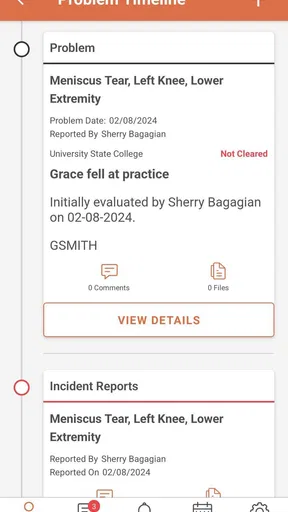
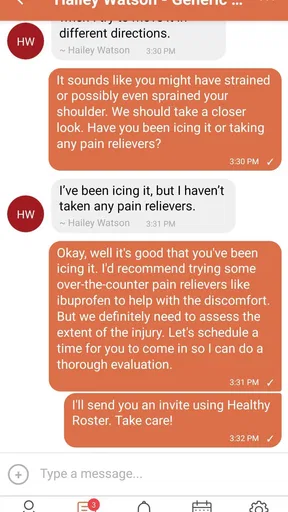
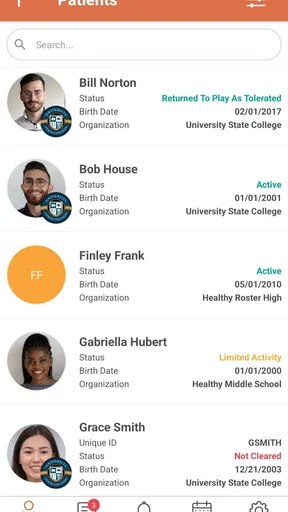
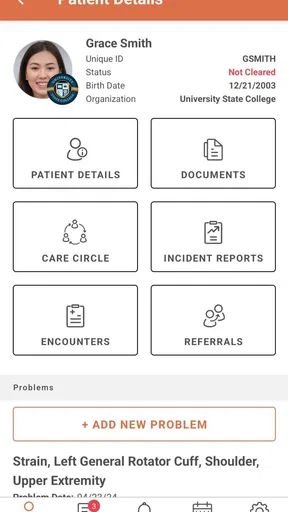
 Analysis by AppCompare
When I look at Healthy Roster, I see a medical app built around one practical problem: helping athletic trainers document care and communicate while they are moving between practices, games, treatment areas, and offices. That focus matters. This is not the kind of app I would choose for general fitness tracking or personal symptom notes. Its value is much more specific: it gives sports-care staff a mobile place to keep their work organized instead of relying on scattered paper notes, messages, and memory.
My overall impression is that the app makes the most sense when several people need a shared view of an athlete’s care. A trainer can record what happened close to the moment of treatment, then use that information as part of ongoing communication. The benefit is not flashy; it is the reduction of small gaps that appear when documentation is delayed or passed between people informally. For a busy athletic department, those gaps can make follow-up harder than it needs to be.
Healthy Roster is a free medical app from Healthy Roster, LLC, and it is available to an Everyone audience. It has been around since October 19, 2015, which gives it a long presence compared with many newer mobile tools. The current version is 6.61.1, and it can run on Android devices using Android 7.0 or later. That older operating-system requirement is useful for organizations with mixed device ages, although each team should still test its own phones and tablets before making it part of a formal workflow.
Documentation becomes more useful when it travels with the trainer
The central capability I would pay attention to is mobile documentation for athletic trainers. In practice, that means the app is intended to support recording and communication at the point where care is happening, rather than treating documentation as an end-of-day chore. That distinction changes how useful a record becomes. A note written soon after an incident is generally easier to connect with the actual situation than one reconstructed later from memory.
I like this approach because athletic training rarely happens at a desk. A trainer may be watching a competition, checking an athlete after contact, answering a question from a coach, and preparing for the next appointment within a short period. A mobile-first tool fits that rhythm better than a system that assumes uninterrupted office time. The app’s purpose is therefore less about replacing professional judgment and more about giving that judgment a consistent place to be recorded and shared.
There is also a subtle organizational advantage. Documentation is not only useful for the person who creates it. It can help the next person understand what has already been addressed, what needs attention, and where communication should continue. That is especially important when more than one trainer, school contact, or sports program is involved. A shared digital record can reduce the temptation to start from zero every time an athlete is seen again.
Still, I would not confuse mobile documentation with a complete clinical system for every setting. The app’s strongest fit is the athletic-training environment described by its purpose. A large hospital, a private clinic with complex billing, or a user looking for a personal health journal may need a different tool with a different structure. Healthy Roster is most convincing when the central question is, “How can our athletic-care team document and communicate more smoothly?”
Worth Reading Before You Choose

EA SPORTS FC Mobile 26 Is a Bigger Football Game, but It Takes Time

Flipboard Shows What News Apps Must Do Beyond the Feed

Switching to Android Auto Means Rethinking Your Driving Routine

Google Calendar Makes a Crowded Week Easier to Manage

Ludo King Makes the Most of the Minutes Between Plans

Baby Panda World Brings Quick Play to Modern Phones, but Its Game Library Feels Busy
What the mobile workflow changes
The first practical change is timing. If I were using the app during a training session, I would want to capture the important details while the event is still clear: who was seen, why the person was seen, and what follow-up communication is needed. Even without turning the process into a long data-entry session, creating a timely record can make later conversations more precise.
The second change is continuity. A paper note may stay in one folder, while a message may disappear into a busy conversation. A dedicated app gives the work a more deliberate home. That does not automatically make every record complete, but it encourages a repeatable habit. For teams, repeatability is often more valuable than a long list of isolated tools.
The third change is communication. The store summary describes the app as supporting both documentation and communication, and that combination is important. Recording an injury without making the relevant people aware of the next step leaves the workflow unfinished. Conversely, sending updates without a reliable record can make it difficult to understand what was previously discussed. Bringing those two activities closer together is the app’s most meaningful promise.
One useful tip is to decide on a team’s minimum documentation routine before introducing the app. For example, trainers can agree that every encounter should end with a clear next action, such as monitoring, reassessment, or communication with an appropriate contact. The app cannot create that standard for the team, but it can make the standard easier to follow. Without an agreed routine, digital documentation can become just as inconsistent as paper documentation.
Using it during a realistic school sports day
Imagine a trainer covering an afternoon practice. An athlete reports discomfort after a drill, so the trainer evaluates the situation and provides care. Instead of waiting until the practice ends, the trainer uses the mobile workflow to document the encounter while the details are fresh. Later, when another staff member asks what happened and what should be watched, the record provides a starting point for that conversation.
The important benefit in this scenario is not speed for its own sake. It is the connection between the event, the record, and the follow-up. If the trainer is interrupted, the information is less likely to remain only in memory. If the athlete returns with a related concern, the previous interaction can support a more informed discussion. That is the kind of small operational improvement I think can justify adopting a focused tool.
There is a trade-off, though. A phone is still a phone, and a busy sideline is not a quiet office. If entering information takes too long or the device is difficult to use with one hand, the trainer may postpone the task. My advice would be to keep the immediate entry focused on what the team truly needs at that moment, then complete any appropriate detail when the environment is calmer. The app works best as part of a disciplined workflow, not as a demand to write a full report in the middle of every interruption.
Where it compares well with familiar alternatives
The usual alternatives are surprisingly varied: paper forms, general note-taking apps, email, text messages, and broader electronic health-record systems. Paper is familiar and does not depend on a battery, but it is harder to share quickly and easier to misfile. General note apps may be flexible, yet they are not designed around athletic-trainer communication. Text messages are immediate, but they are poor long-term documentation. A large clinical platform may offer more depth, but it can feel excessive for a sports program that needs a focused mobile workflow.
Healthy Roster sits between those options. It is more purpose-built than a generic notes app and potentially less burdensome than a full clinical platform. That middle position is its main strength. I would consider it for a school, club, or athletic department that needs a shared process but does not want to build one from ordinary messaging tools.
However, “more focused” can also mean “less suitable” for people who want broad customization. If your organization already has a mature medical-record system, adding another place to document may create duplication rather than solve it. Before adopting the app, I would map where information currently lives and decide whether Healthy Roster would replace a step or merely add another one. A free app can still have a real cost if it creates extra entry work.
The friction points I would plan around
The average rating is 3.3 from around ninety ratings, with around thirty written reviews. I would read that as a reason to approach the app practically rather than assuming that every user will have the same experience. A rating in that range suggests that the concept may be useful while usability, expectations, or individual workflows can vary. I would test the current version with the people who will use it most before rolling it out across an entire program.
Another consideration is adoption. Documentation tools only help when the team uses them consistently. If one trainer records everything in the app while another continues using paper and messages, the shared picture becomes incomplete. The app may then appear unreliable even when the real problem is an uneven process. A short internal orientation and a simple rule about where the official record belongs could make a bigger difference than adding more features.
Device compatibility is also worth checking. The minimum Android requirement is 7.0, which is relatively accommodating for older hardware, but compatibility on paper does not guarantee a comfortable experience on every device. Screen size, battery condition, connectivity, and the amount of time a trainer spends outdoors can all affect mobile work. I would test the app in the actual places where care is delivered, not only at a desk with a strong connection and plenty of time.
Privacy and professional responsibility should remain part of the decision. This is a medical app, so teams should establish who is allowed to view or enter information and how the app fits their own organizational procedures. I would not treat the convenience of mobile access as a reason to relax normal care, documentation, or communication standards. The technology should support the process, not define the boundaries of professional practice.
Small workflow choices that make the app more useful
My first recommendation would be to use it as the starting point for follow-up, not merely as an archive. When a trainer opens a previous record, the useful question is not only what happened but what needs to happen next. Turning each encounter into a visible continuation can prevent documentation from becoming a collection of disconnected entries.
Second, I would separate urgent communication from routine documentation in the team’s habits. A record can support a conversation, but a trainer should not assume that every person who needs to know will notice an entry at the right moment. For time-sensitive matters, the team should have a clear communication practice in addition to recording the event. This is a key trade-off: a documentation app can improve coordination, but it should not be treated as an automatic alert system unless the team has confirmed that behavior in its own setup.
Third, I would review the workflow after a week of real use. Which entries are being delayed? Which details are repeatedly forgotten? Which people are still relying on side conversations? Those answers can reveal whether the app is reducing friction or simply moving it somewhere else. This kind of review is more useful than judging the app after one quick installation.
A fourth insight is that the app can be most valuable during handoffs. When one trainer finishes a shift or another person takes over care, a timely record may reduce the need to reconstruct the story verbally. That does not eliminate the need for direct discussion, especially when the situation is complex, but it can make the handoff more grounded. In a busy sports program, that is a practical benefit that a generic messaging app does not provide as naturally.
Who is likely to benefit most
I think Healthy Roster is best for athletic trainers and sports-care teams that need mobile documentation and communication in one focused environment. It may also suit organizations where several people share responsibility for athletes and where paper records or scattered messages are causing avoidable confusion. The fact that it is free lowers the barrier to testing it, particularly for a smaller program that cannot immediately invest in a large clinical platform.
It is less compelling for someone who wants a personal wellness tracker, workout planner, medication reminder, or general-purpose medical diary. Those users may find the athletic-training focus unnecessary. I would also be cautious if your organization already requires a separate official record and has no way to prevent duplicate entry. In that case, Healthy Roster could become an extra task instead of a simplification.
The age rating of Everyone makes the app broadly approachable from a store perspective, but that should not be confused with a recommendation for unsupervised medical use. The intended value comes from fitting it into a responsible athletic-care workflow. The people using it should understand their role, their organization’s procedures, and the difference between documenting communication and making a clinical decision.
With over one hundred thousand installs, the app has reached a meaningful number of Android users, yet its moderate rating tells me to keep expectations realistic. I would not install it and assume the workflow will organize itself. I would choose a small group of trainers, define how records and communication should be handled, and then judge whether the app saves time and improves continuity in that specific environment.
My recommendation after weighing the trade-offs
What I appreciate most is the app’s clear center of gravity. It does not need to be everything for everyone to be useful. By concentrating on athletic-trainer documentation and communication, it addresses a real gap between informal messages and heavyweight medical software. The strongest result comes when a trainer records care promptly, the team knows where to look, and follow-up remains connected to the original encounter.
What keeps me from recommending it without qualification is the human side of the workflow. A mobile tool cannot fix unclear responsibilities, inconsistent habits, or duplicate systems. The middling average rating also makes a hands-on trial sensible. I would test the current version with actual staff, on actual devices, during the kinds of practices and events where the app is expected to help.
For the right audience, I would recommend giving Healthy Roster a fair trial. It is free, focused on medical documentation for athletic trainers, and compatible with Android 7.0 and later. For a team still balancing paper, texts, and scattered notes, that focus may be exactly what makes it worthwhile. For a personal user or an organization seeking a full clinical-record replacement, I would look elsewhere. The best reason to use it is not that it promises to replace every tool, but that it can make one important part of sports care more consistent.
In short, I see Healthy Roster as a practical coordination app whose success depends on how deliberately a team adopts it. Use it to capture encounters while they are fresh, support handoffs, and keep follow-up connected to documentation. Do not rely on it to replace professional judgment or every form of urgent communication. If that balance matches your needs, it is a sensible app to evaluate.
Pros
- Centralizes injury records
- forms
- and care information in one place.
- Helps teams communicate more efficiently about athlete health updates.
- Supports digital documentation instead of relying on paper records.
- Can improve visibility for coaches
- parents
- and medical staff.
- Useful for organizations managing many athletes and health-related tasks.
Cons
- Some features may require an organization invitation or active account.
- The app’s usefulness depends on staff and athletes keeping data updated.
- Health information access may vary according to assigned user permissions.
- Initial setup can take time for teams with many athletes and records.
- Not a substitute for emergency care or direct medical evaluation.
FAQs for Healthy Roster
What is Healthy Roster used for?
Healthy Roster is a digital platform designed to connect patients, families, healthcare providers, and organizations in one place. It can be used to manage health information, communicate with care teams, complete forms, review updates, and follow aspects of an injury or treatment plan. The exact features available may depend on the provider, school, employer, sports organization, or clinic using the service.
Is Healthy Roster free to download and use?
The Healthy Roster app may be free to download, but access and available features can depend on the organization or healthcare provider that invited you. Some users may receive access through a school, sports team, employer, clinic, or other participating group. Before downloading, check whether you have an invitation, registration code, or account information, since simply installing the app may not provide access to every feature.
What information do I need to create a Healthy Roster account?
Registration requirements can vary depending on how your organization provides Healthy Roster. Typically, you may need an invitation, email address, mobile phone number, personal details, or an enrollment code. You should use accurate information and follow the instructions supplied by your healthcare provider or organization. If you cannot locate an invitation or have trouble verifying your account, contacting the organization that enrolled you is usually the best solution.
Is my health information secure in Healthy Roster?
Healthy Roster is intended for managing and sharing health-related information between authorized users and participating organizations, so privacy and account security are important considerations. However, users should still review the app’s privacy policy, permissions, and terms before using it. Protect your login credentials, avoid sharing verification codes, and use a secure device. The information visible to you may also depend on your organization’s access settings.
Can parents, coaches, or caregivers use Healthy Roster for someone else?
Healthy Roster may support authorized access for parents, guardians, caregivers, coaches, administrators, or other people involved in a patient’s care, depending on the organization’s setup and applicable permissions. This can make it easier to receive updates, complete required information, and communicate with the appropriate care team. Access is not automatic, however, and the organization may need to approve or invite additional users before they can view or manage another person’s profile.


